Monday, January 30, 2017

Hide Column if all Rows are empty in SSRS report - AX 2012

If there is a requirement to hide a column if all rows are empty. Use the below expression 

=IIF(Fields!ColumnSample.Value = Nothing, True, False)

Wednesday, January 11, 2017

How to rename records in Microsoft Dynamics AX7

In earlier versions of Microsoft Dynamics AX people were used to use the right-click menu in case it was needed to rename the primary key of a record. This post will tell you about renaming records in the current version of Microsoft Dynamics AX (aka AX7).

What is the renaming feature?

Every table needs to have a primary key to have records unique and identified. In e.g. the customers table, the account number is unique and cannot be inserted with the same value twice. In some rare cases you could be in the need to rename records. When you rename the primary key, all related tables will be looped and the new key will be replaced in these tables as well. Suppose you are changing the Project ID of a project, then all related hour transactions, revenue transactions, etcetera are also changed with the new ID. So the database will be kept consistent.

The former life

In the past we could open the right-click menu from a field and choose the option Record info. The form Record information is opened and when the table supports renaming and you have the correct permissions you can rename the record.

Rename records

When you now use the right mouse button, there is no option displayed to show the Record information form. Is the feature still supported?
The answer is yes. On each form in Microsoft Dynamics AX, there is a menu item Record info on the OPTIONS menu tab page.Click on the Record info button to get the next dialog presented:
The dialog gives you also the option to show all fields or view database log records related to a certain record. These options were also available in Microsoft Dynamics AX 2012. Click on the Rename button to change the Project-ID in this example.Fill the new Project ID and click OK to continue.
A latest confirmation will be asked before the record will be renamed. Click Yes to proceed.You will notice that the project has been renamed and when you check related transactions, these are also changed.

There is more...

To end with this blog, I would also give some important notes related to this functionality.
  • As related records will be changed to reflect the new record identification, this can take some time. Especially when there are a large number of records.
    Also if a related table is not having an index on the related identification field a performance issue can occur in case of many records.
    If you rename records in a global table, all companies will be looped to change related records in other tables. A large number of companies can also have effect on the duration of the rename function.
  • When a table has a Record ID as primary key with a natural key field, you will be presented to rename a Record ID. An example is the Worker table. You cannot rename the Personnel number.
  • If you want to rename an item number, there is an additional check if you have setup the table as scheduled job. In that case it is not allowed to change the primary key.
  • The rename function relies on table relations defined on tables in the development environment (Visual Studio). If a table relation is missing, tables might be skipped causing inconsistent data.
  • Always test if the rename function is working correctly and really all related tables are changed accordingly in a separate environment before doing this is a production environment.
Actual post : https://www.linkedin.com/pulse/how-rename-records-microsoft-dynamics-ax7-andr%C3%A9-arnaud-de-calavon

@Rahul Talasila

Wednesday, December 28, 2016

How to display information only on the last page within the page footer in SSRS

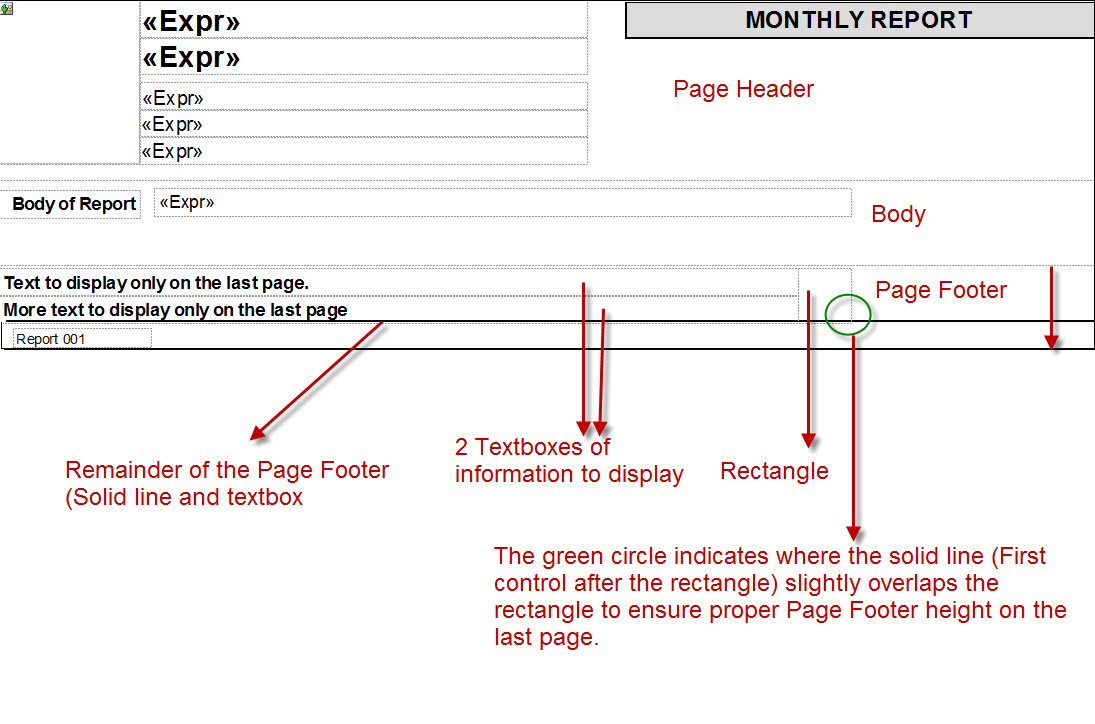
Since SSRS does not have a report footer, it can be challenging to figure out how to display information one time within the page footer on the last page. Here is one workaround that works well.
At the top of the page footer, add a rectangle. Change the hidden property of the rectangle to:
=IIF(Globals!PageNumber=Globals!TotalPages,false,true)
In order to not upset the height of the footer area on the last page, the first control after the rectangle (The rest of the page footer information) needs to overlap the rectangle.

Saturday, August 20, 2016

SSRS Deployment Failed - The "DeployToReportsServerTask" task failed unexpectedly

Error

The "DeployToReportsServerTask" task failed unexpectedly.
System.IO.FileLoadException: Loading this assembly would produce a different grant set from other instances. (Exception from HRESULT: 0x80131401)
Symptoms: You get the error when trying to deploy a report either by using VS2013 reporting tool or through AOT
Resolution:
1. Go to Control Panel\System and Security\System
2. Open Advanced system settings and open Environment Variables
3. Create a New Variable
4.Variable name: COMPLUS_LoaderOptimization ; Variable value: 1
5. Click OK
6. Logout from the server and logon again.
7. Open the report using Visual Studio 2013 and deploy the AX report.
8. The report can also be deployed from AOT

@Rahul

Wednesday, July 27, 2016

MS Dynamics AX 7 Development - Packages, Models, Projects

Packages, Models, Projects in AX 7. Let's figure out what is it.

Package in AX 7 is independent deployable unit of one or more model.
Model is a group of elements (metadata and source files) that typically constitute a distributable software solution.
Project - simple Visual Studio project that stores AOT elements. The project helps you group the elements.


A simple way to understand is described on image below.


Package are folders located in the model store folder of the AX 7 application. The default model store folder is “c:\packages”.


Model folders are contained in their package folder. A model folder contains type-specific folders.


Every dependency of packages are described in descriptor files and can be shown in AX 7 viewer.


In model view, AE is organized by models. The package that a model belongs to is shown in parenthesis next to the model name.


The main purpose of VS project is to store AOT elements. AX 7 has not Shared or Private projects. Each user has their own projects that each of them related only to one model. Use multiple projects in Visual Studio solution to work with elements from different models.

Task Recorder In AX 7.0

Hi Guys,

Here i am sharing steps for how to use task recorder in AX 7.0.

Step 1 ->  Go to Navigation Pane > Task Recorder.


The Task Recorder Pane ope

Note :The user may click the “X” in the upper-right corner to close the Task Recorder Pane before beginning a new recording. The pane can be reopened by following the previous steps.

Step 2 : Click Create to create a new recording. Enter a name for the recording and click Start. Recording begins the moment   Start is clicked.

Note: During recording, clicking the “X” in the upper-right corner will hide the pane without stopping the recording. The pane can be re-opened by clicking the Task recorder menu button that appears at the top of the screen. This icon only appears while recording is in progress.
This image shows the Task recorder toolbar button which allows opening the Task recorder pane while recording.

Once you are done with the recording click on "Stop" button to stop recording.

Finally you can save your recording in your local PC, life cycle services, you can download it as word document and save as developer recording(XML Format).

@Rahul Talasila

Tuesday, July 26, 2016

Microsoft Dynamics AX 7.0 Development System Requirements

The Microsoft Dynamics AX development environments can be hosted locally or in Microsoft Azure.
The build process, X++ compilation and generation of cross reference information, will typically run satisfactorily on machines with 16 GB of memory and 2 CPU cores. However, the compiler will use available resources, so more RAM and more cores may translate into faster compilations, especially if there is contention for the resources from other processes running concurrently. In such cases, we recommend 24 GB of memory with 4 cores.
At a minimum, 2 CPU cores are recommended because the Dynamics AX developer environment contains many components that may be running concurrently, including the AOS web application, Visual Studio, Management Reporter, and SQL Server.
@Rahul Talasila

What is the primary purpose of using a Solution in Microsoft Power Platform & ALM?

As organizations embrace low-code development with Microsoft Power Platform , it becomes essential to manage and govern apps, flows, and dat...