Wednesday, October 18, 2017

Get unused Project categories In AX 2012

Below is the code for getting the unused project dimensions in AX.

Note : Please create a table(Test) with two string fields.


static void ProjCategory(Args _args)
{
    ProjUnpostedTransView   projUnpostedTransView;
    ProjPostTransView       projPostTransView;
    CategoryTable           categoryTable;
    Test           test;
    int iCounter;
    delete_from test;
    while select * from categoryTable
    {
        test.clear();
        select firstOnly projPostTransView where projPostTransView.CategoryId ==  categoryTable.CategoryId;
        if(projPostTransView)
        {
            continue;
        }
      //  else if(!projPostTransView)
      //  {
        select firstonly projUnpostedTransView where projUnpostedTransView.CategoryId ==  categoryTable.CategoryId;
        if(projUnpostedTransView)
        {
            continue;
        }
        else
        {
            test.AccountNum = categoryTable.CategoryId;
            test.Name = categoryTable.CategoryName;
            test.insert();
            iCounter++;
        }

SQL Query:

select * from CATEGORYTABLE where not exists
( select * from projPostTransView where CATEGORYTABLE.CategoryId =  projPostTransView.CategoryId) and 
not exists (select * from ProjLedgerJournalTransUnpostedView where CATEGORYTABLE.CategoryId =  ProjLedgerJournalTransUnpostedView.CATEGORYID)


@Rahul Talasila

Get Unused Main Accounts In AX 2012

Below is the AX code for getting the unused main accounts for a legal entity.

Note : Please create a table (TestMainaccounts) with two string fields.

static void Ledgeraccounts(Args _args)
{
    DimensionAttribute dimAttribute;
    DimensionAttributeValue dimAttributeValue;
    DimensionAttributeLevelValue dimAttributeLevelValue;
    TestMainaccounts  test;
    Ledger  Ledger;
    LedgerChartOfAccounts   ledgerChartOfAccounts;
    FiscalCalendarPeriod    fiscalCalendarPeriod;
    //OGILedgerDimensionTable oGILedgerDimensionTable;
        MainAccount                         mainAccount, mainAccountLoc; //Holds the main accounts
    GeneralJournalEntry                 generalJournalEntry; //Used to hold Ledger transactions
    GeneralJournalAccountEntry          generalJournalAccountEntry; //Used to hold Ledger transactions
    SubledgerJournalEntry               subLedgerJournalEntry; //Used to hold sub Ledger transactions (Like sales/purch invoice etc.)
    SubledgerJournalAccountEntry        subLedgerJournalAccountEntry;  //Used to hold sub Ledger transactions (Like sales/purch invoice etc.)
    DimensionAttributeValueCombination  dimAttrValueComb; //Used to store the combination of main accounts and dimensions
    int i;
    container conCompanies ;//= [ 'cm1', 'cm2', 'dat' ];
    CompanyInfo companyInfo;
    container   concreteCompanies;
    int         concreteCompanyCount;
    CompanyId   currentConcreteCompany;
    boolean     canDelete;

    SysDictTable tableToCheck;

    TableId         entityId;
    RecId           entityInstance;
    DataAreaId      dataAreaId;
    RecId           financialTagCategoryId;
    Common  _table;
    TableId _roleViewId = 0;
   // --VALIDATES NO LEDGER TRANSACTIONS HAVE BEEN POSTED.
    delete_from test;
    while select mainAccountLoc
    {
        _table = mainAccountLoc;
        [entityId, entityInstance, dataAreaId, financialTagCategoryId] = DimensionEnabledType::getFieldsForDeleteOrRename(_table, _roleViewId);

      select * FROM generalJournalAccountEntry
            JOIN dimAttrValueComb where generalJournalAccountEntry.LedgerDimension == dimAttrValueComb.RecId
            JOIN mainAccount where dimAttrValueComb.MainAccount == mainAccount.RecId
                && mainAccount.MainAccountId == mainAccountLoc.MainAccountId//"10604100"
            JOIN ledgerChartOfAccounts where mainAccount.LedgerChartOfAccounts == ledgerChartOfAccounts.RecId
            JOIN Ledger where Ledger.ChartOfAccounts == ledgerChartOfAccounts.RecId;

         select firstonly RecId from dimAttributeLevelValue
        exists join dimAttributeValue where
            dimAttributeValue.RecId == dimAttributeLevelValue.DimensionAttributeValue &&
            dimAttributeValue.EntityInstance == entityInstance &&
            dimAttributeValue.IsDeleted == false
        exists join dimAttribute where
            dimAttribute.RecId == dimAttributeValue.DimensionAttribute &&
            dimAttribute.BackingEntityType == entityId;

        if(!generalJournalAccountEntry && !dimAttrValueComb && !dimAttributeLevelValue)// && !ledgerChartOfAccounts && !Ledger)
        {
            test.clear();
            test.AccountNum = mainAccountLoc.MainAccountId;
            test.Name = LedgerChartOfAccounts::find(mainAccountLoc.LedgerChartOfAccounts).Name;
            test.insert();
            i++;
        }
    }
    info(strFmt("%1 total records", i));
}


SQL Query :
--------------

select * from MAINACCOUNT as a where not exists(
select * FROM generalJournalAccountEntry
            JOIN DimensionAttributeValueCombination on generalJournalAccountEntry.LedgerDimension = DimensionAttributeValueCombination.RecId
            JOIN MAINACCOUNT  as b on DimensionAttributeValueCombination.MainAccount = b.RecId and
b.MAINACCOUNTID = a.MAINACCOUNTID
            JOIN ledgerChartOfAccounts on b.LedgerChartOfAccounts = ledgerChartOfAccounts.RecId
            JOIN Ledger on Ledger.ChartOfAccounts = ledgerChartOfAccounts.RecId) and
        not exists( select * from DimensionAttributeLevelValue
join DimensionAttributeValue on
DimensionAttributeValue.RecId = DimensionAttributeLevelValue.DimensionAttributeValue and
DimensionAttributeValue.EntityInstance = a.RECID and
DimensionAttributeValue.IsDeleted = 0
join DimensionAttribute on
DimensionAttribute.RecId = DimensionAttributeValue.DimensionAttribute
and DimensionAttribute.BackingEntityType = 11762)

@Rahul Talasila

Wednesday, August 16, 2017

Display methods in D365 Finance Forms SSRS reports

Display method in Forms
---------------------------------------------------
In AX7 we don’t have the option to create methods on table extension, so we should use the extension class to do that. The example below will show how to create a display method on the table extension class and use on a form extension.
First create your table extension class and your display method following the example below:
1
2
3
4
5
6
7
8
9
public static class MyCustTable_Extension
{
    [SysClientCacheDataMethodAttribute(true)] //This attribute will cache your display method.
    public static display Name myDisplayName(CustTable _this)
    {
        return _this.nameAlias() + "myDisplayName"; //Do here your display method as usual.
    }
 
}
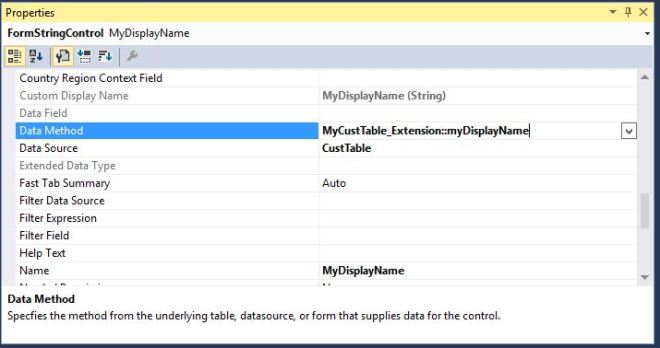
To use your display method on the form, create your new field on the form extension and use the property as below:
Capture
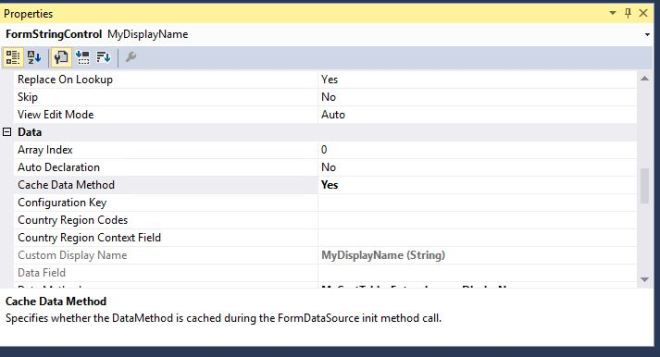
To cache your display method on the form set on the field the property “Cache Data Method” = yes if you don’t want to use the Attribute above.
Capture2

Display method in SSRS reports
------------------------------------------------------

f you are developing report based on query rather on based on RDP, you may want to make use of some display methods, but those may not work. “Not work” means no error in compilation or build, everything great but you may not see any results while you run the report. The returned data can be empty.

If so is the case, I would recommend to create a View and write display methods on the view. Now the display methods which are coming from View, will show you results properly. 


For more details please see below URL's.

https://shyamkannadasan.blogspot.com/2017/07/display-methods-on-ssrs-report-d365o-ax.html

https://community.dynamics.com/365/financeandoperations/b/microsoftdynamicsaxextensions/posts/display-methods-on-ssrs-report-in-msdyn365fo


Tuesday, August 15, 2017

How to disable a form control in AX 365

// <summary>
/// Created by Rahul - 08/15/2017 for disabling LogisticsPostalAddress_Street control
/// </summary>
class LogisticsPostalAddress_EventHandler
{
    /// <summary>
    /// We are disabling LogisticsPostalAddress_Street control here
    /// </summary>
    /// <param name="args"></param>
    [PostHandlerFor(formStr(LogisticsPostalAddress), formMethodStr(LogisticsPostalAddress, updateControls))]
    public static void LogisticsPostalAddress_Post_updateControls(XppPrePostArgs args)
    {
        FormRun sender = Args.getThis();
        sender.control(sender.controlId(formControlStr(LogisticsPostalAddress, LogisticsPostalAddress_Street ))).allowEdit (false);
    }

}

Or second way

[FormControlEventHandler(formControlStr(SalesTable, ButtonLineInventory), FormControlEventType::Clicked)]
    public static void ButtonLineInventory_OnClicked(FormControl sender, FormControlEventArgs e)
    {
        FormDataSource      salesLine_ds  = sender.formRun().dataSource("salesLine"); //DataSource form CustTable
        FormRun             element       = sender.formRun(); //form element
        FormControl         buttonLineInventReservation   = element.design(0).controlName("buttonLineInventReservation"); //New button on the form

        buttonLineInventReservation.enabled(false);
    }


Please refer below post also.
https://rahulmsdax.blogspot.com/2018/08/how-to-hide-form-control-in-ax-365.html

Friday, June 9, 2017

Account for transaction type Depreciation, value model XXXX, does not exist for fixed asset ######.

Reason : Main account and offset account is missing for depreciation in posting profiles

Solution :

Go to fixed asset posting profiles -> Filter ledger account by "Depreciation"

Add posting profiles for your fixed asset group


Tuesday, April 18, 2017

Recent versions of Dynamics 365 for Operations

ReleaseVersionBuild numberAvailabilitySupport end dateTo learn more
Microsoft Dynamics 365 for Operations platformPlatform update 57.0.4475.16165March 2017March 31, 2018
Microsoft Dynamics 365 for Operations platformPlatform update 47.0.4425.16161February 2017February 28, 2018
Microsoft Dynamics 365 for Operations1611 7.1.1541.3036November 2016November 30, 2019What’s new or changed in Dynamics 365 for Operations version 1611 (November 2016)
Microsoft Dynamics 365 for Operations platformPlatform update 3 7.0.4307.16141November 2016November 30, 2017What’s new or changed in Dynamics 365 for Operations platform update 3 (November 2016)
Microsoft Dynamics AX platformPlatform update 27.0.4230.16130August 2016August 31, 2017What’s new or changed in Dynamics AX platform update 2 (August 2016)
Microsoft Dynamics AX platformPlatform update 17.0.4127.16103May 2016May 31, 2017What’s new or changed in Dynamics AX platform update 1 (May 2016)
Microsoft Dynamics AX application7.0.17.0.1265.23014May 2016June 30, 2017What’s new or changed in Dynamics AX application version 7.0.1 (May 2016)
Microsoft Dynamics AX platform7.07.0.4030.16079February 2016January 31, 2017What’s new or changed in Dynamics AX 7.0 (February 2016)
Microsoft Dynamics AX application7.07.0.1265.3015February 2016June 30, 2017What’s new or changed in Dynamics AX 7.0 (February 2016)

Support matrix

The following table provides information about the multiple releases of Microsoft Dynamics 365 for Operations platform and Dynamics 365 for Operations application, and which versions are supported.
Microsoft Dynamics AX 7.0 Microsoft Dynamics AX application 7.0.1Microsoft Dynamics 365 for Operations (1611)
Platform update 5CompatibleCompatibleCompatible
Platform update 4CompatibleCompatibleCompatible
Platform update 3CompatibleCompatibleCompatible
Platform update 2CompatibleCompatible
Platform update 1CompatibleCompatible
Platform 7.0Compatible

Update policy

Microsoft Dynamics 365 for Operations is serviced as a cloud offering. Updates to the Dynamics 365 for Operations platform and application will be handled in the following manner:
  • Dynamics 365 for Operations cloud platform updates will be initiated by Microsoft. After you provide your consent, platform updates will be rolled out to provide critical updates and features to the Dynamics 365 for Operations cloud platform.
  • Dynamics 365 for Operations application updates will be initiated by you, the customer. After you provide your consent, application updates will be applied to your production environment.
Application and platform updates will be scheduled with you, the customer. When platform and application updates are released, a sandbox environment will be made available to you, so that you can validate the updates. For details about how the sandbox environment will be provided, see the licensing guide.
Important: Some updates may be mandatory and require no consent. To help protect our customers and the service, Microsoft may apply critical updates directly to your Dynamics 365 for Operations production environment. If a critical issue is discovered, the following events will occur:
  • Microsoft will notify you about the critical update.
  • Microsoft will notify you of the required downtime window (if any) and apply the critical update to your Dynamics 365 for Operations production environment.
Dynamics 365 for Operations is supported according to the Microsoft Modern Lifecycle policy, which provides consistent and predictable guidelines for product support availability.
Original Post : https://ax.help.dynamics.com/en/wiki/manage-microsoft-dynamics-ax-online-updates/

What is the primary purpose of using a Solution in Microsoft Power Platform & ALM?

As organizations embrace low-code development with Microsoft Power Platform , it becomes essential to manage and govern apps, flows, and dat...